






A New Communication Tool for RCC’s Summer Camps
RCC streamlines Summer Camp communication with ePACT, a secure online platform that simplifies emergency contact sharing and delivers real-time updates.
- Simpler Forms: Enter your child’s emergency contact information once and update it anytime. Information is securely stored online, eliminating paper forms.
- Peace of mind: Receive real-time email or text notifications for important updates – such as travel camp delays or schedule changes – so you’re always aware of your child’s schedule.
After you register your child(ren) for RCC’s Summer Camp, you will receive an email invitation to set up your ePACT account. It’s quick and easy, designed to keep you informed all summer long.
ePACT FAQs
What is ePACT?
ePACT is a secure online platform that simplifies emergency contact sharing and delivers real-time updates from RCC Camps.
Why is RCC using ePACT?
ePACT will streamline summer camp communications:
- Simpler Forms: Enter your child’s emergency contact information once and update it anytime. Information is securely stored online, eliminating paper forms.
- Peace of mind: Receive real-time email or text notifications for important updates – such as travel camp delays or schedule changes – so you’re always aware of your child’s schedule.
I have never used ePACT before. How do I set it up?
After registering for camp, you’ll receive an email from ePACT with instructions to set up your account.
Step 1: Accept Invite
After you register for your child(ren) for RCC’s 2026 Summer Camp, you will receive an email invitation to set up your ePACT account. Click the orange “Complete Request” at the bottom of the email to get started.
Step 2: Create Account
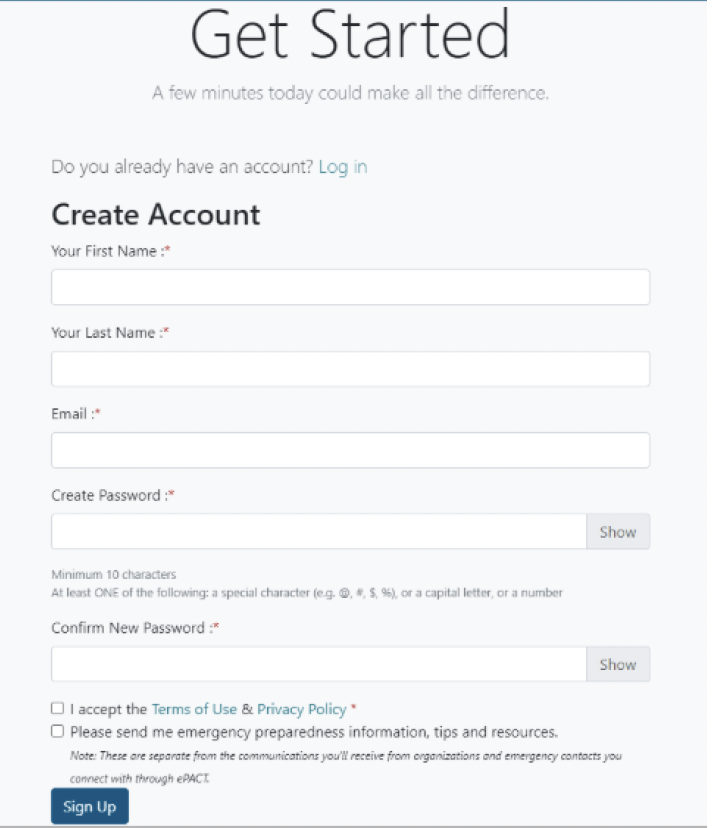
You will be directed to the “Get Started” page, where you can complete your information to create an account.
Click the “I accept the Terms of Use & Privacy Policy*” to register.
Then click “Sign Up.”
Step 3: Verify Account & Login
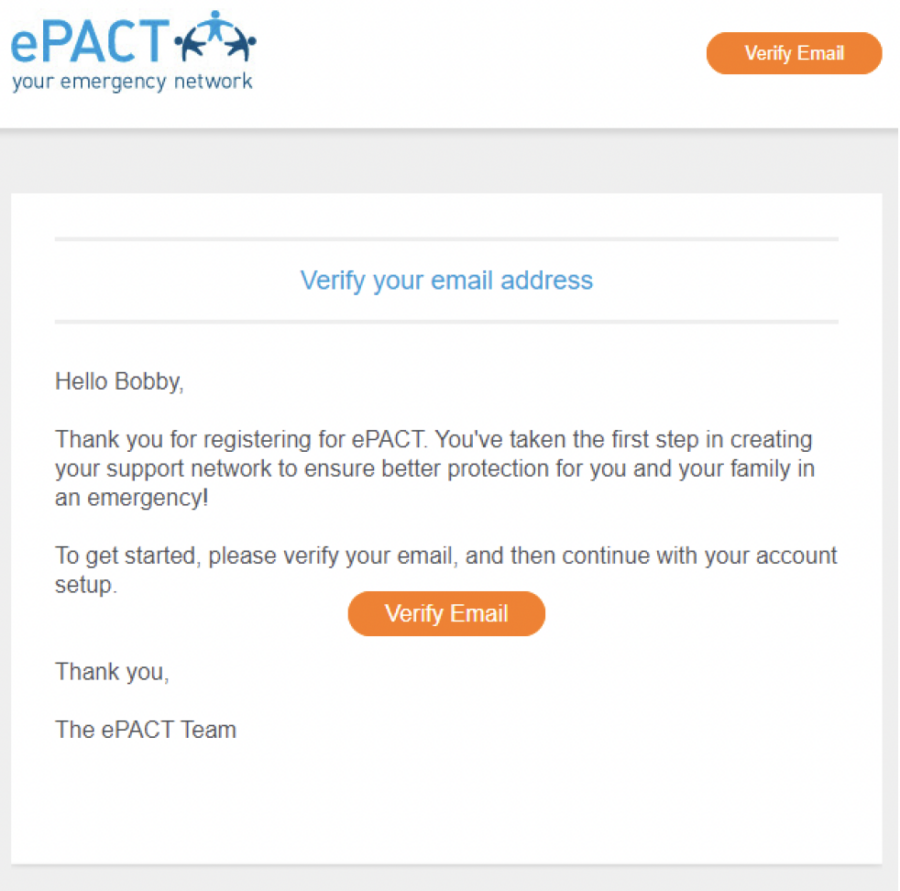
You will then receive another email from ePACT to verify your email address. Click “Verify Email” to finalize your account.
Please check your spam/junk email folder if you don’t see this email. If you cannot find it, you can send an email to member.support@epactnetwork.com from the email associated with your account.
Step 4: Log In and Get Started
Once your email is verified, you should be able to log in to your ePACT account and complete the emergency information.
Click “My Requests” on the top left.

Step 5: Accept Request
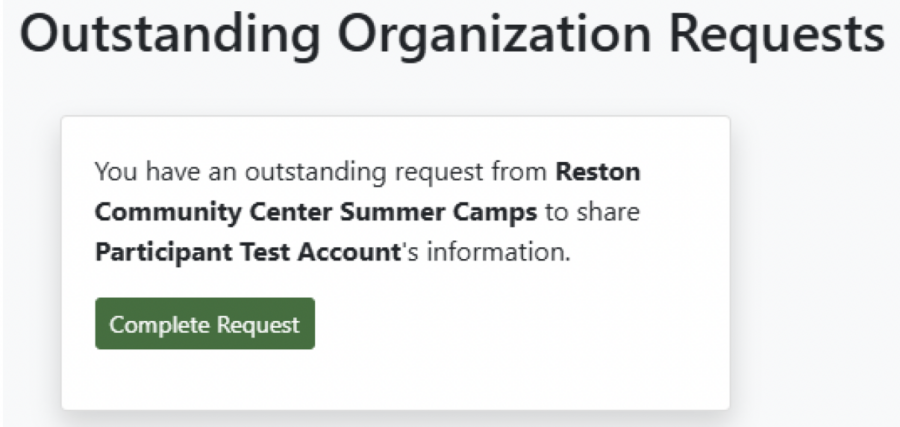
Under invitations, you can “Complete Request” for each child you registered for camp. This will allow you to fill out your emergency forms.
I already have an ePACT account. How do I connect with RCC using my existing ePACT account?
After registering your child(ren) for RCC’s Summer Camp, you will receive an email from ePACT asking you to “Accept Invite.”
If you registered for RCC camp with the same email that is connected to your existing ePACT account, you will be directed to your ePACT account.
Click “My Requests” in the top left to see a new invitation from RCC. “Accept” the request from Reston Community Center Summer Camps to complete RCC’s emergency forms.
You will need to use the same email for RCC registration as you use for your existing ePACT account. If you did not use the same email for RCC registration, contact RCC customer service at 703-476-4500, ext. 8 or RCCcontact@fairfaxcounty.gov.
I created an ePACT account. How can I log in to update emergency information?
You can visit epactnetwork.com to log-in to your existing ePACT account and update information at any time.
I registered for RCC Summer Camp but did not receive an email from ePACT. What should I do now?
First, check your spam/junk folder. If you cannot find it, you can send an email to member.support@epactnetwork.com from the email associated with your account.
To receive future emails, add @epactnetwork.com to your email’s “whitelist” (e.g., mark sender as “not spam” or “not junk”).